
Used by agencies, coaches, and event-driven businesses
Embed a Google Sheets Event Calendar on Any Website — No Plugins, No Monthly Fees
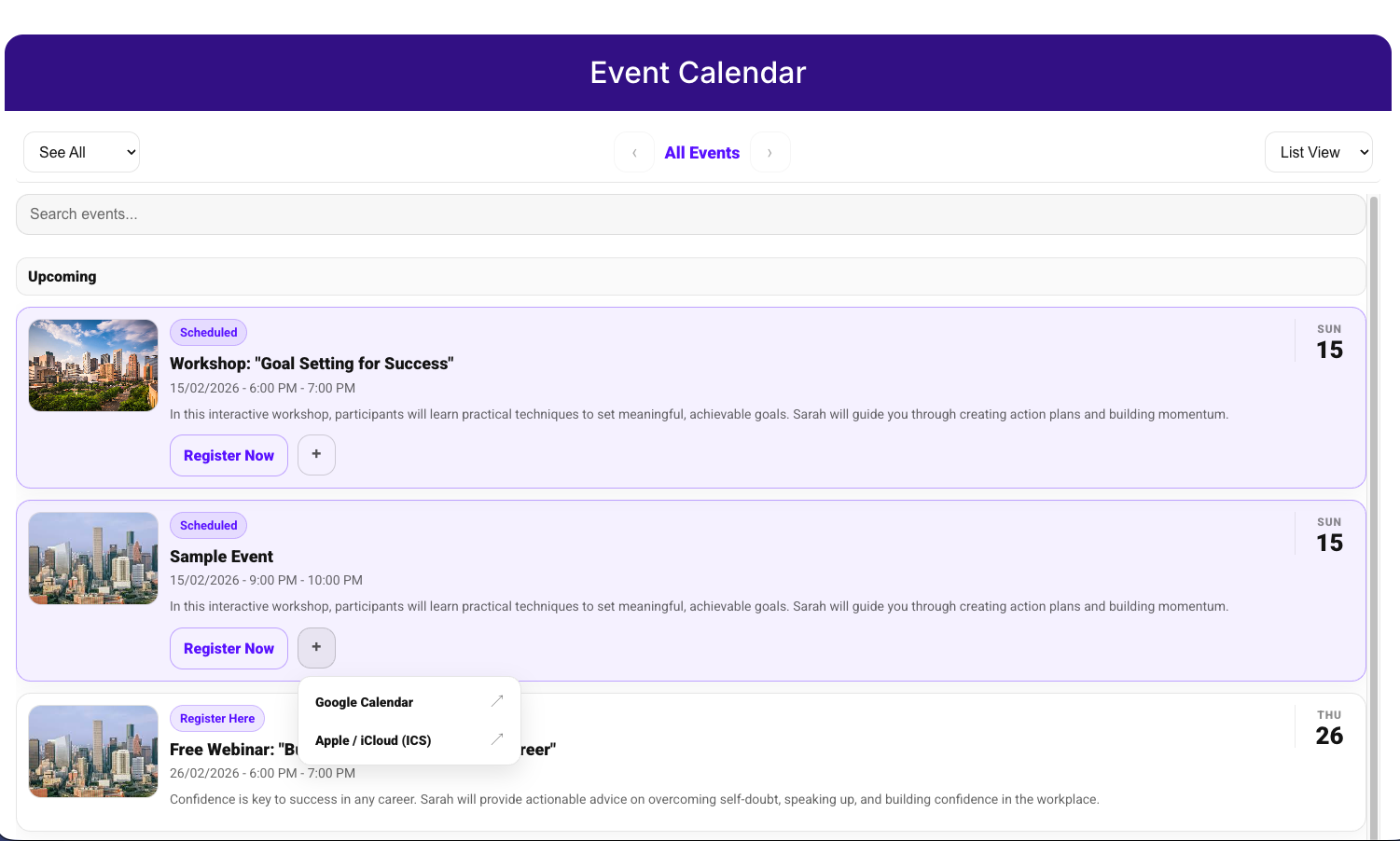
Display workshops, webinars, classes, or events on your website using Google Sheets. Fully embeddable in GoHighLevel, WordPress, Wix, Webflow, and more.
Perfect for Any Event-Based Business
Insurance agents hosting Medicare workshops
gyms offering group classes
coaches running webinars
agencies hosting training sessions
churches organizing events
schools and education programs
If you run workshops, webinars, group classes, or live events, SimpleEventCalendar gives you a clean, branded event calendar powered entirely by Google Sheets.
No plugins. No developers. No subscriptions.
Most Website Calendars Are Complicated, Expensive,
or Limited
WordPress plugins require setup, maintenance, and monthly fees
GoHighLevel has booking calendars — but no public event calendar display
Custom development costs hundreds or thousands of dollars
Google Calendar embed looks outdated and unprofessional
Updating events manually wastes time
SimpleEventCalendar solves all of this.
Manage Your Website Calendar
Using Google Sheets
Just update your Google Sheet, and your website calendar automatically updates.
No technical setup required.
Your team already knows how to use Google Sheets.
Everything You Need to Display and Manage Events
Monthly grid/list calendar view
Event images support
Add-to-Calendar (Google, Apple, Outlook)
Registration buttons
Mobile-friendly design
Search and filtering
Status control (open, closed, hidden)
Brand color customization
How It Works
01
Connect Google Sheet
Add your google sheet in your configuration settings
02
Customize calendar
Select Theme and primary color to match your brand
02
Embed on website
Copy the Embed Form Link provided
Benefits
01
Google Sheets Event Calendar Integration
Connect your Google Sheet and instantly display events on your website calendar.
02
Works with GoHighLevel, WordPress, Wix, Webflow, and More
Embed your calendar anywhere using a simple iframe.
03
Increase Event Registrations and Conversions
Visitors can register, buy tickets, or add events to their personal calendar in one click.
04
No Monthly Fees — Pay Once, Use Forever
Avoid recurring subscription costs.
Simple Pricing
One-time payment. No subscription.
Starter
$49
Who it's for: One business, one brand
1 calendar
Google Sheets integration
Self-use only
*Cannot be used for client work, Single business only
Pro
$99
Who it's for: One owner, multiple businesses
Unlimited calendars
Google Sheets integration
Google Calendar integration (premium feature)
Multiple calendars under one owner
*Cannot be used for client work, Single owner only
Agency
$199
Who it's for: Agencies serving clients
Unlimited calendars
Unlimited client usage
Commercial usage rights
*Use inside client accounts
Boost your success instantly! dd the Full Event Snapshot for $97—one time, your ready-to-use system for seamless event management! See details on check out.
Full Event Snapshot: Your Instant Event System
Pre-built structure, DIY.
Inclusions
Event registration and check-in page
Event Outreach campaign
Confirmation, Reminders and Follow-up nurture sequence
Attendance and No-Show Tracking system
Review Management System
Onboarding Handoff
STILL NOT SURE?
Frequently Asked Questions
Quick answers.
Does it work on Wix / WordPress / Squarespace?
Yes — it’s an iframe embed. Any platform that allows embedding HTML supports it.
Do I need Google Calendar to use it?
No — events are managed in Google Sheets. Visitors can optionally add events to their calendars.
Will my site update when the sheet updates?
Yes. The embed reads the sheet and renders the calendar automatically.
Can I hide past events?
Yes — you already have a “Past events: Hide/Show” setting.
Ready to Embed Your Calendar?
Upcoming updates
Actively improving — these features are next.
🔥 Google Calendar Integration
Sync events from your google calendar
🔥 Separate calendars per group
Example: workshops, webinars, kids events — each with its own embed and filters.
🔥 Category colors
Assign colors by type/status/category — especially useful in grid view.
Don't worry, we can help!